
 Updated 12 July 2022.
You don’t like your own voice on recordings, yet you cannot afford or have no time to hire a professional voice-over? Here is wonderful software that almost gets it right: NaturalReader. This software turns text into speech with voices that are way more sophisticated then any speech software of your Operating system. It is available for both Mac and PC.
Important notice: the business model of Natural Reader has changed. there are certain restrictions, therefore read the TOS carefully.
Have a look at this video and you will find out this is much better then any robot voice you ever heard:
Of course it is not perfect and you may have to adapt the spelling if the voice pronounces some words in a strange way. But I think you agree that this is an acceptable result and actually far better then what I do myself if I record video tutorials, for instance. 😉
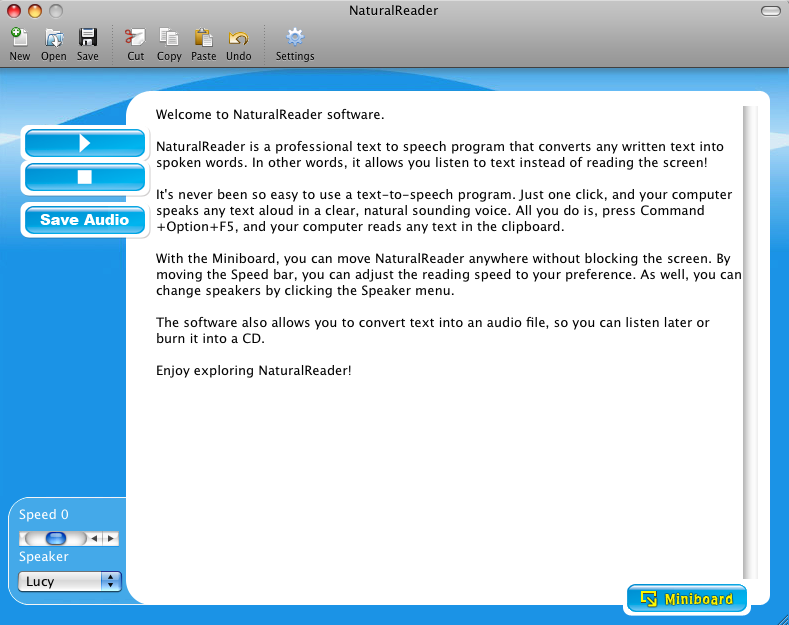
The software works with NaturalVoice voices from several software houses, like at&t, Neospeech and Acapela. You can buy extra voices for a reasonable fee or select a package with two NaturalVoices included, like I did. The voice I used in the video above was Lucy, a UK voice from Acapela. For the fun of it, I called her Lucy Acapella. There is also a Graham male voice in my package but he is not that good. He puts the wrong emphasis almost everywhere. He is only good for short sentences.
The PC version has US, UK, French, Spanish, German, Swedish, Italian and Arabic voices while Mac has US, UK, French and Spanish. The pronunciation per language is quite convincing. Here you can test the voices yourself: https://www.naturalreaders.com/widget.html.
For some reason, the Mac version is more expensive then the PC version, but it is still very affordable.
Typical problems
Wrong emphasis is the big give away of robot voices and although the NaturalVoice series do a good job, you do not escape from awkward sentences here and there. You can get rid of it by trying to formulate your sentences differently until is sounds natural. Another problem is that some words are cut off too soon. To avoid that, you need to be imaginative with spelling. It can also help to slow down speed here and there. You can vary the speed anywhere you like, thanks to the Conversation Control Panel:

It let’s you change speaker, insert pauses and change the speed. So, if you have a long text, you can vary voices and speed. Using dots helps as well.
There is also the Pronunciation panel that lets you save words with phonetic spelling or you can create shortcuts:
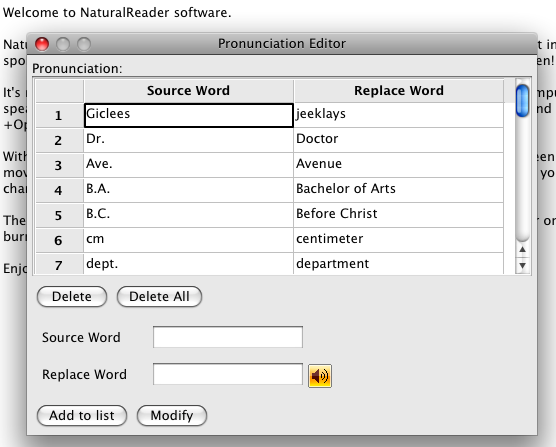
As you can see above, I changed the word Giclees into jeeklays to force the voice to pronounce it properly. Since the word is saved in the list, it will automatically use the custom pronunciation as soon as the software encounters the word Giclees. That way you can correct a lot mistakes with uncommon words.
The Acapela group has a tutorial on TTS voices output: https://www.acapela-group.com/tts-output-optimization/ that you may find useful.
I rewrote quite lot of sentences, not only because emphasis was placed on the wrong words, also because it did not sound right. And that brings me to the next topic: NaturalReader as an aid to improve your writing.
NaturalReader helps proofreading
You would be surprised how different text and speech is. Having a voice-over proofread what you have written helps to pinpoint awkward writing as you hear it being said. I’m not a native English speaker although I lived in the UK for a long time. So, my English is wobbly most of the time. Yet, when I run a text past NaturalReader, I hear immediately something is wrong. It is only a matter of changing the wording until it sounds right. That is an added bonus I did not count on when I bought this software.
Proofreading with a professional voice-over would be quite expensive. Imagine hiring a voice-over, you let him/her test a few sentences and then discover that it needs rewriting. Corrections have to be paid extra, so if you want to work with real voices, running a test upfront with NaturalReader helps you prepare your texts upfront and you can even do that at night.
Voice-overs that never sleep
Another advantage is that your voice-over can work day and night, rehearse a thousand times without getting tired or annoyed and you do not need to pay overtime. And most importantly, they are there whenever you need hem. No booking time involved.
License fee versus real cost
I actually got my license fee out of it with the first video. The video above is a bit more then 3 minutes, so count on it that you pay at least $200.00 for a real voice to cover a video like that. I bought the package of two voices for only $69.50 USD (Mac version). The links in this article are no affiliate links, by the way, I have no stake in this software.
Real voice-over versus software
True, a real voice-over professional will do it a lot better since humans are vastly superior in their capacity to express emotion, but if you compare this software with what it produced a few years ago, you will be stunned at the evolution. Soon, you will no longer hear the difference and real voice-overs make mistakes too. I worked with quite a few of them in the past and a common problem is that they can sound like they are reading text instead of talking spontaneously. NaturalVoice voices are not reading, they speak, be it in their own funny way, but they have a bright future ahead. So, investing in software like this will help us all in the long run.
How about Support?
Support for the software is poor. I asked them if there was a way to influence how emphasis is placed on certain words but I never received a reply. However, the software is so easy to use that you do not need support, except for this unanswered question, that is. I suspect they have no answer for this one currently.
In any case, I give NaturalReader software a well deserved 4 stars for excellence. If their support was responsive, it would have gained 5 stars.

Natrual Reader causes Adobe Captivate to lock up when installing/importing sound files…..what to do..
I think you best contact support, Cliff, because I do not know Adobe Captivate personally. So far, I had no problems importing audios from NaturalVoice into Adobe AfterEffects, but it is always possible that something within the file disagrees with this or that application. Sorry I cannot help you.
Hi Rudolf
Thank you for a great review.
How would you recommend it is used to create training videos? I’m trying to get my head around how we would use it on a video timeline to ensure that the right text is read in a certain part of the video.
I appreciate your help.
Kind regards,
Albert
Hi Albert,
For training videos, you will need a screen recorder tool, such as ScreenFlow(Mac) or Camtasia (PC). These tools let you import audio files and you can move them around on the timeline. Camtasia exists for Mac as well, but on Mac I prefer ScreenFlow.
Thank you very much for your this article and article on wp verses joomla. I am very new to blogging and not technical person. I was just wondering how others make good videos . As my blog is about education I need to make some videos, please if you can guide me more about how to get more visitors to my blog.
Hi smrutims,
It depends what kind of videos you mean. You have screen recorded tutorials, “talking head”- videos and documentary style videos. Screen recording is used to explain software. Talking heads are good to explain ideas, documentary style is more elaborate, with action, flow charts and what not.
How to make a good video requires investigation. I suggest you go to Vimeo and pick any subject you find interesting and view a couple of educational videos. You will find that some are good, and some are not. Write down what you like and dislike about the videos and use that experience to create your own.
When your videos are good, you will get more visitors automatically, but you can give it a boost by following the articles on http://www.copyblogger.com. You do not need to buy into his programs, just read his articles and observe what he actually does on his own blog.
I hope that helps?
i want to call the natural reader software on button click . this button is on my html page. but wen i call it it gives error.. tried many code samples..plz revert back some1….
function delayer()
{
document.getElementById(‘bttnadd’).click();
window.location.href = “”C:\Program Files\Naturalsoft\free10\NaturalReader10.exe””;
return false;
}
and i tried one more code sample:
<a href="\Program Files\Naturalsoft\free10\NaturalReader10.exe" rel="nofollow">Play Audio</a>
none of the above works.. thnx and reply..
none of the above works..
thnx and reply..
Dear Sabiha,
You are calling an .exe file in a browser, so you only have two options: it either shows the code of the exe, resulting in an error, or it will ask you to download it. Browsers are not made to be used as task managers for windows- or Apple native applications.
Why don’t you simply drag the icon of NaturalReader into the taskbar?
I like it, but it doesn’t use the correct intonation when forming questions. For example: “A dog.” and “A dog?” would sound the same.
Yes Matt, I agree in some circumstances it messes up, whatever you try. But if you write “Who are you?” then it clearly sounds like a question. It depends on the sentence and it can be a challenge at times to find a workaround.
Hmm, I bought this… version 11. Does not come with a conversation control 🙁 Hardly any tweekable menus at all. Somewhat disappointed. Pronunciation editor works fine, but it needs to have different settings for different texts, not just one default option for all of them. Often its pronunciation is not wrong per se, only in that particular context. For most texts a V is simply V, but for others it should be pronounced Volts.
Hi Eystein,
I see they moved the conversation control to the professional version now.
In that case, try insert this to change voice:
\Vce=Speaker=Graham\ where “Graham” is the name of the voice.
\Pau=1000\ to insert a pause of 1 second
\RSpd=140\ to speedup the speaking. \RSpd=86\ to slow it down. “100” is standard.
It’s not sure it will work, but you can give it a try. If it works in version 11, these commands normally take effect from the point they are inserted. You can put them anywhere in the text and as often you like.
If you want it to say Volts, you have to spell it out. Their claim about reading existing text just like that it over-optimistic, but to be honest, no other software does it better.
Thanks for sharing.
I found it useful to embed SAPI 5.3 control tags as XML to the text. That can help make the it sound more natural. An overview of the control tags here: https://msdn.microsoft.com/en-us/library/ms717077%28v=vs.85%29.aspx
A small example here:
Did you record that record ?
Back to normal speed again. Eight hundred milliseconds of silence just occurred.
– Martin
Very interesting, especially the pitch of the voice. It’s something I found missing in the controls. Thanks for sharing, Martin!
{Edit} However, it does not work with the silver edition since the xml tags have no effect. It is actually not clear which version you need.
”
Did you record that record ?
Back to normal speed again. Eight hundred milliseconds of silence just occurred.”
Sorry, the control tags in my example does not show up aftr it is posted as html above.
Look at this video instead, and you get the idea: https://www.naturalreaders.com/howto.php?referp=pcbar&index=12
You can add tags like shown in the video to your own text.
I bought the software to do exactly this, but was disappointed with their licensing terms. Apparently, NaturalReader is ONLY for personal use, not for any commercial, public, websites, or distributing purposes. Checked with their customer rep who said that websites cannot post the videos 🙁
Hi Sam, possibly a new rule. It was certainly not the case when I bought the software.
But I’ll check with them on this because I think it is a ridiculous measure.
The voices are NOT owned by NaturalReader, and the owners of the voices clearly mention that licensing is required for commercial use. I just found acapela-box dot com where you can at least buy it off at an affordable price!
Hi Veda,
I never said NaturalReader owns the voices, they are from several software houses and you need to follow the license agreement in each instance. But when I bought those voices, there was no limitation on their use. In the meantime, NeoSpeech and Acapela seem to have changed their business model and provide now their own speech software.
http://www.acapela-box.com is certainly an alternative, but I prefer to work directly from my local computer instead of via the cloud, forcing you to connect via the internet each time you want to use the application.
Thanks. Although it didn’t work for me on macbook pro (Mavericks). It crashes and kicks me out. I like the natural sound which is not available on the free version…
I just bought the Ultimate Value Pack as I want to convert a story and have different voices for different characters.
I’ve tried all morning looking for the Conversation Control and the Pronunciation Editor but I can’t find them. I downloaded the Help file but it doesn’t tell me where to find the functions either.
Can you help me?
Hi Elaine,
You find it under the menu Tools.
Okay, I found the two functions and it’s coming together. Slowly.
Just gotta figure how to insert a pause.
This is under the Tools menu also: Conversation tool. “Silence” is expressed in seconds.
I used to have a perfect and useful version of Natural Reader / Naturalsoft free software, downloaded from the internet in 2012, until I lost it when my laptop crashed this January. I wonder where I can find such software again, please? I don’t recall the version but it had no word quota per day like this version 13 and translated unlimited number of words in one go several times a day.
Hi Steph,
Sorry I missed your comment somehow. Yes, it looks like they have set quite a few limitations in version 13. The paid version has no limits, though ($129.50 package).
But playback of text reading is quite slow when using the HD voices on Windows, yet I have a brand new laptop.
Anyway, I’m afraid there is no longer an older version to be found. I suggest you contact sales at naturalreaders.com and explain your situation.
Can I use this awesome software for free in a youtube video (and are there regulations) if I credit natural reader in the description?
I think you best ask the authors of NaturalReader. I’m just a user myself, no affiliate or whatever.
It sounds like a robot being sick!! This is surely a terrible example of a robot voice!!
Hi James,
I think you exaggerate a little.:-)
That said, perhaps you know more then I do. For instance: Do you know more advanced robot voices? If so, I would be grateful if you could point us into the right direction.
Rudolf, I’m grateful you said it for me: “True, a real voice-over professional will do it a lot better since humans are vastly superior in their capacity to express emotion”.
Eventually, machine voices may become as engaging as human ones – but only when silicon boards become as intelligent, empathic, creative and capricious as humans. A century maybe?
Hi Howard,
No doubt about that. That said, I don’t think it will take a century to create perfect voice-overs. After all, it is not that difficult to develop parameters that simulate human emotion. Currently, we can only influence speed and pronunciation but as soon as the software developers add parameter configurations for accentuation, you will see a big stride forward.
The licensing terms for the voices are quite prohibitive – other than using an application like NaturalReader to read stuff to you personally I’m finding it not worth the value to purchase.
I agree that the latest licensing terms are quite astonishing. When I wrote the review, it wasn’t that strict.
However, it is possible via the voice-over sites to purchase the commercial rights per audio, depending on its length.
The pricing is reasonable, especially in comparison with real voice-over. So, I still find it worthwhile, but this is different for everyone. The ideal would be to be able to use it without restrictions, but they obviously thought they struck a goldmine.
Can i use it for commercial videos or for my website. I have also bought same two voice package. But thing it can only be used for personal use and not commercial.
Thanks for article.
Unfortunately, you can’t, Pruthu. However, there is a way around this: You can go to the site where you got the voice from and you contact them, explaining the length of the video. They have a rate per minute pricing. It is still far cheaper then working with a real voice-over, although it is quite annoying having to work this way.
Hello,
Enjoyed your review of NaturalReader. I encourage you to do a review of Speech-Over (www.speechover.com) – software that generate text to speech narration for e-learning and training courses and videos. You will be happy to see that Speech-Over has solved the problem of wrong accents in TTS voices.
Thanks
Joel Harband
Tuval Software Industries (developers of Speech-Over)
Nice article I have read above about voice over software that does the talking for us. I am glad to visit here and got an interesting information. Thanks for sharing this information..
May I ask, how you uploaded to voice-over to your video ?
Hi Daniela,
I used Adobe AfterEffects, but there are various video editors available that are cheaper or even free.
iMovie or FinalCut Express on Mac, for instance.
For PC, you can use PowerDirector, Windows Movie maker…
The process: You save each phrase as an audio, so that you can move them at exactly the right place in your timeline.
It is also possible to save all text as one audio and import that into the timeline, but I prefer to break it up in little pieces as I did with this video.
When you are done importing the audio, making sure it begins where you want it to begin, you can export the video with the voice-over included.
Thank You so much !!!
What is the use of using the software if it is for personal use only? Majority of people probably want to use it for documentaries or short videos. I almost purchased it. Lucky me.
Do you know any other softwares that allow for public/commercial use?
Hi Clive,
You are right about that, but it’s not the software that makes the license, it’s the natural voice companies milking it out. Therefore, any software you would use, will likely fall under the same restrictions. However, various natural voice companies offer a way to get a license for commercial use. You pay per minute. So, a voice-over of about 3 minutes, costs around $35.
You can even create your audios online, but personally, I prefer to work from my own computer, that is why I find the software handy, especially with the pronunciation editor and the speed control panel.
Buying Natural Reader Software with additional voices was a costly mistake that resulted from not reading the license terms carefully, I guess. I see absolutely no point of paying that much just to have your computer ‘read’ something for you. There should at least be an option to buy an extended license at a reasonable price to use the software for commercial purposes. After all, it’s not a product you can use to produce miraculous results as it has its own limitations in terms of what you can create with it.
I fully agree with that, Zoran. The problem is with the voice software itself, though. They are very protectionist because they sell training courses themselves and they actually don’t want competition. I really hope one day that some folks start to create Open Source voices.
Well, I’m happy to see there IS an option to subscribe to a commercial version of Natural Reader. I think the price is reasonable. I just wish, there was such an option at the time when we purchased the desktop software with additional voices. They have no use to us anymore. 🙁
Try contact Natural Reader about this, Zoran. If enough people complain, they might change their policy.
Hello i have been trying to use the conversation control but i don’t know how to go about it its reading out the code?? i hope you get what am saying and you can help on this am using version 14
Hi Rudolf, thanks for this great recommendation. Since this software is for personal use, it would definitely help me when I am writing a script and to correct errors. Wonderful tool, and great review.