
Topics

What's New?


Tags/Keywords

artifacts aspect ratio audacity audio audio service avs converter blogs branding brightcove camcorder cloudberry explorer cloudfront compression embedding firefox flash flash video flv hd hdv high definition iphone joomla jw player podcasting publishpod quicktime s3 s3 amazon s3 browser Skype software streaming streaming video tubemogul upload video videocast video channel Video Channels/Networks video format vimeo wordpress xlr youtube

Online Marketing - OnToplist.com
Online Marketing

Free Favicon Generator

Page copy protected against web site content infringement by Copyscape


Vocal booth for podcasting

By Rudolf Boogerman | Share this with your favorite social network
1 comment... Click to Contribute.

A vocal booth helps improve acoustics for a microphone and it can be a complete cabin or a portable booth. A complete cabin is relatively expensive but offers generally a better result then the portable version, although it depends on the situation. Some studios use a cabin and place a portable booth inside, but that is usually for singing.

When should you use a vocal booth?

If you don’t have the space to setup a cabin booth or you don’t want to spend $750 to $1500, a portable booth is a good alternative.  They go for about $200. Also, you can take a portable booth with you on location. Or, if you really want to go for cheap, you can create one yourself with good quality foam, preferable from a specialized company.

The portable booth is not ideal when using in combination with a camcorder because it is quite bulky and therefore difficult to keep out of sight unless you don’t mind being filmed from above or aside, which gives a rather unusual effect.
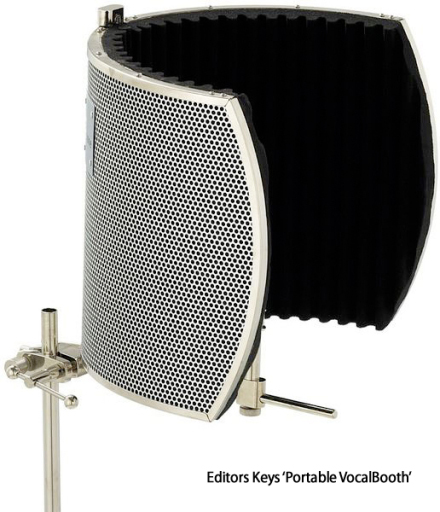
Here is an example of a portable booth offered by editorskeys.com.

The microphone is placed within the semi circle that consist of several layers of sound absorbing material.

In a cabin boot, it is easier to set up a camcorder but the background looks a bit dorky with the foam and so on, therefore you might want to cover the foam with a green screen as a background which you can replace with something more interesting by using any video editor supporting chroma key, like Adobe AfterEffects or one of the smaller applications (type green screen video software in google to get a list).

Now, there are several ways to get a booth. You can buy one, or if you are good with your hands, build one yourself.  Building it yourself is a lot cheaper, but it is a bit of work and it won’t have the same quality as the real thing. However, the difference is small, so you might want to watch the video tutorial below on creating a vocal booth by David Cirino, songwriter, producer en sound engineer.   David knows his territory and he explains everything in great detail, even what type of nails to use, so for some of you, the video may drag on a bit, but he doesn’t forget a thing and that is so great about his tutorial:

You need the Flash Player installed to play this streamingvideo.


If you want to know more about David, this is his video channel on YouTube http://www.youtube.com/user/davidthegreat99

If you want to go for the real thing or you don’t want to mess with building a booth yourself, below are some good quality vocal booths for sale. Click on the images to find out more about a particular booth.

Auralex MAX-Wall 1141VB Vocal Booth (Charcoal Grey)

Auralex MAX-Wall 1141VB Vocal Booth (Charcoal Grey) – Eleven 20″ x 48″ x 4 3/8″ Mobile Acoustic Panels, One 20″ x 48″ x 4 3/8″ Mobile Acoustic Panel with Window Cut-Out, Four MAX-Stands, Four MAX-Clamps and Twelve CornerCouplers MAX-Wall 1141VB Vocal Auralex Acoustics MAX-Wall MAX-Wall 1141VB Vocal Booth (Charcoal Grey)

Auralex MAX-Wall 1141VB Vocal Booth (Charcoal Grey)

ClearSonic IsoPac F Vocal Booth (Dark Grey)

ClearSonic IsoPac F – Medium Vocal Booth Kit with Dark Grey SORBERS, Lid System and Fan IsoPac F Vocal ClearSonic Acoustics Vocal Booth Kits IsoPac F Vocal Booth (Dark Grey)

ClearSonic IsoPac F Vocal Booth (Dark Grey)

ClearSonic IsoPac E Vocal Booth (Light Grey)

ClearSonic IsoPac E – Large Vocal Booth Kit with Light Grey SORBERS, Lid System and Fan IsoPac E Vocal ClearSonic Acoustics Vocal Booth Kits IsoPac E Vocal Booth (Light Grey)

ClearSonic IsoPac E Vocal Booth (Light Grey)

Topics: Hardware reviews, Video and audio techniques | Site search | Write comment
This article has one comment.


Related Articles:

1 Comment »


Page copy protected against web site content infringement by Copyscape

If you have any questions or suggestions, you can leave a comment on this article below. Comments are subject to an approval process before they are published. By posting a comment, you agree with the terms of use.

One Response to “Vocal booth for podcasting”

  1. Amma
    Amma Says:
    April 22nd, 2009 at 8:36 am

    Interesting to know.

Comments


Most popular posts(since 24/01/12)

Recent Comments:

  • Allison: Huh… looks like embedding is a Vimeo Plus option only. I’m not sure you mentioned that in the...
  • Allison: The hubnut widget looks like exactly what we need, but it doesn’t play. I have customized it to a...
  • brett: @Loretta, not sure if your issue is the same as mine, but my videos wouldn’t play in Firefox/Chrome...
  • bob marley (@thatBobMarley): Please *adapt* article for adaptive streaming as the article’s engineered interweb...
  • erick: Hi Rudolf, I am trying to embed a video in an eventbrite page that I am about to publish. However, it says I...
  • dharmendra singh: its a nice comparision between joomla & wordpress. note : good point:-you can be listed in...
  • Camille: Thank you for such an in-depth review! All very relevant to me. The main reason I have stuck with a large US...
  • jakerusty: thanks for providing Joomla module title links. keep posting…
  • Rodney: Ihave an Alesis Multimix12 Firewire mixer! The problem is my HP laptop does not have access for an Express...
  • RudolfB: Ah, yes, that happens, even to coders ;-)

Most commented posts