 TimedText is a convention to place subtitles in videos without actually embed them in the video itself. This has huge advantages over embedded (hardcoded) subtitles because you can use the same video while using different languages, depending where you show it. TimedText can be used in two ways: Closed Captions or Open Captions.
Closed Captions(CC) are used for the hearing impaired, in other words, the subtitles are not shown, unless the viewer clicks a button to activate it. Thus, regular viewers are not distracted by those subtitles.
Open captions(OC) are used for translations and they show up as soon as spoken text appears in the video.
In the UK, and Ireland and indeed many other countries, the terms Open- and Closed Captions are not used. They utilize the term subtitles and make no difference between open and closed captions as such. If you want to know more about the terminology,goto: http://en.wikipedia.org/wiki/Closed_captioning#Terminology
How to use TimedText (TT)
The basic format of TimedText is quite easy. It consists of a simple xml file with the timing and the subtitle text itself. Below, you find an example of such an xml file:
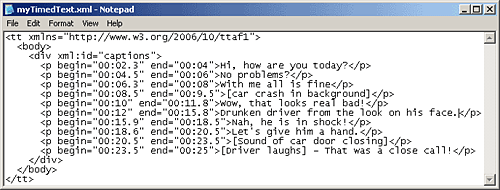
When you want to create a TimedText file , you only need to adapt the content indicated in red:
<p begin=”00:02” end=”00:04“> Hi, how are you today? </p>, leave the rest as is. We provided a sample file in text format in the Member area you can use as a basis.
The begin and end attributes contain the timing. The timing is noted like this: minutes:seconds, and seconds can be divided into tenths of seconds like this: 01:05.3
The begin tells the video player to start showing a line of text at a given time and the end says when to remove it again. Then what follows after the closing bracket > is the subtitle.
In the example above, the subtitle Hi, how are you today will be shown on the video at 00:02 and it will last for 2 seconds, since it ends at 00:04.
Needless to say, this should be synchronized properly with the spoken text. If possible, show it a fraction earlier then the actor actually says it, so that the viewer has already a glimps of the content before it is said and moves to a new line. You will have to test this, of course, and then tweak it until you have it right.
In the example above, you also see something like this: [Car crash in the background]. This is meant for Closed Captions because someone with a hearing problem will not hear that crash, so you have to tell him, yet making a distinction between speech and background noise. Square brackets are a convention to indicate background noise.
Here you find an extensive tutorial with more popular formats: SRT, WebVTT, DFXP
TimedText or SRT can be used on YouTube and JW Player, the player for embedding video and audio into your website. You can find a full description on all attributes that can be used for TimedText here: http://www.w3.org/TR/ttaf1-dfxp/ although it needs to be said that this is a highly technical article and most online video players will simply ignore most of the extra attributes as TimedText is actually meant for a wide variety of authoring tools.