
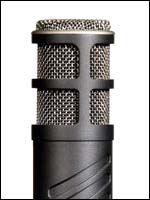
 You have that wonderful and rather expensive external mic with XLR connection and discovered it doesn’t work on your computer? Yet, you bought an adapter for the XLR connection to fit into the sound board of your computer and it still doesn’t work? Chances are that your mic needs a lot of phantom power. Professional mics need that extra power and most computers, including Mac, are not configured to work with this sort of mics. Most good quality sound cards do not provide phantom power either. Therefore, what you need is a little external mixer or audio interface. Preferably a firewire mixer if you have firewire on your computer, otherwise USB will do a reasonable job as well. Below I discuss a firewire mixer and an external USB audio interface.
Alesis Multimix 8 Firewire
Alesis has a very good entry level mixer that exists in 2 flavours: Firewire or USB 2.0.
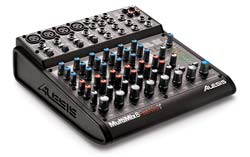
You can find this device for as low $165- $200 USD and it is very easy to operate.
It is plug and play, meaning that it installs very easily and if you follow the instructions of the non technical manual, it is set up in minutes. It comes with Steinberger’s Cubase LE for Mac/PC and it has 4 female XLR ports and lots of stereo jack ports, including a headphone port. On your mic, you will need a male XLR jack to connect to the mixer. You can use regular mics as well on this mixer too, as long as they have either a stereo jack or XLR connection. Mini jack- or usb headsets don’t fit. As the mixer has many options, it might take a bit of time getting used to all the options, but the manual is written with beginners in mind, so that helps a lot. The reviews about this device are mixed. Some adore it, others just hate it.
In my personal opinion, I think this device is OK, although the mixer tends to overheat after an hour or so. This results in crackling noises in recorded audio. It could have more sturdy buttons as well, but this is a very low priced mixer, so they have to economize on some points.
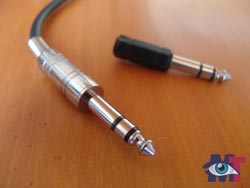 Stereo Jack(1/4″)
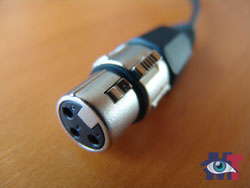 XLR jack(female version)
Here is the official feature page of the Alesis multimix 8 firewire.
The mixer is compact, so it won’t take too much space on your desktop (it is like half the size of a laptop). Yet, it weights heavy enough so that it doesn’t slide easily from the desk to the floor by accident. Just don’t buy this device in order to use it with a cheap mic, it makes no sense if you do not work with good material.
The rule of the thumb is: your sound is only as good as the weakest link in the chain.
Edirol UA-25 USB Audio Interface from Roland
Currently replaced by Cakewalk UA-25EX High Quality 24-Bit/96 kHz USB Audio Interface
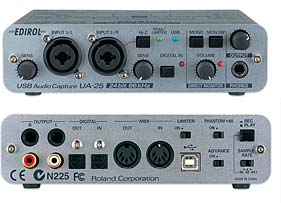 You can find this device for as low as $185-$200. The reviews about this device are very good. One minor point might be that the USB 1.1 connection can cause a delay while recording, thus you will need to have a bit of patience on some computers before the audio is transferred to the computer. Most USB interfaces do not have phantom power for condenser microphones, but this one does. It has variety of input connections under which XLR, RCA Jacj, Stereo Jack(1/4″) and more. It comes with Cakewalk’s Sonar LE, an audio application for Mac and PC. This device is much smaller then the Multimix8 Firewire as it is not a mixer. Therefore it is easier to handle but it doesn’t have the same options as a mixer. If you want to record vocals/speech, this a great option. Roland has build up a solid reputation as a provider for professional music equipment, so you can’t go wrong with this device.
As with the Multimix8 Firewire, it makes no sense to work with a cheap mic. A good mic costs several hundred dollars.
Here is the official feature page on the Roland website
I haven’t tested the Edirol UA-25 USB Audio Interface myself, so I can’t give you a personal review, but Roland does make good products, so I’m quite confident about it. As a rule of the thumb, always read several reviews (the more the better) and never pay attention to emotional reviews because they are unbalanced.
What about a USB microphone?
USB mics may work on a Mac, they almost certainly will work on a PC, therefore if you have a good one and it gives good results, no need to change.
But if you are still looking around and plan to spend several hundred dollars on a good quality mic, you might want to use it on your camcorder as well instead of the built-in mic. Since USB mics do not fit on most camcorders you may want to consider buying a mic with a XLR jack, preferably a condenser microphone, since they have superior quality. Even if the camcorder only has a mini jack plugin to connect with an external mic, with an adaptor of only $7 USD you will have superior audio quality compared with the internal device.

Gosh, this is such good news! I have been struggling with this for a long time. I couldn’t connect a mic on my Intel mac mini and didn’t understand why. Even the Apple site didn’t give me a proper explanation. Thank you soooo much!!!
Merill
Do you know if it’s possible to connect an professional mic to iPhone?
Hi Xavier,
Connecting a professional mic directly to iPhone is not possible. That said, if there is some way to connect an external device that intermediates between your professional mic and your iPhone, you can get somewhere.
Now, I’m not an iPhone user myself, so I can’t speak from first hand experience, but I did some research on the subject and bumped into one article that may (or may not) help you on your way:
http://createdigitalmusic.com/tag/iphone/
Let me know if you found this helpful. I noticed more folks struggle with this question.
hey
i found ur article very helpfull n i really apreciate ur effort
m a new user of mic n i dun know how should i record my songs i mean i have instrumental songs n i want to record my lyrics on it
i ll be very thankful to u if u can help me
thankxxxx again n happy new year
Hi Khan,
Both devices I show here can be used to connect music instruments. I’m not a musician, though, I’m more a multimedia person. So I’m not the guy to turn to when it comes to guitar playing and such, but here is an article from someone explaining about setting up your recording studio on a mac mini:
http://www.engadget.com/2005/02/08/how-to-turn-your-mac-mini-into-a-low-cost-recording-studio/
In case you work with PC, you will find that a lot of advice he gives counts for PC as well.
However, the article tends to praise low end stuff. Read also the comments and be careful with mics of $40 and cheaper. They are usually not worth it.
Before you buy anything, read as many reviews as possible.
I hope to have my video tutorial ready on how the connect the Alesis Multimix8 Firewire by the end of this week, but it might get a bit later then that, it is rather busy this week, but I’ll do my best.
I hope this helps you on your way:-)
May I say that I’ve not been able to find this level of details when it comes to explain multi media as I find when I visit your site Rudolf.
Your talent to explain this stuff in an easy to understand way is simply mid blowing.
Thanks for your commitment to keeping your faithful readers up-to-date!
Miss Gisele B.
Thanks, thanks for this informaton. I am trying to use my Shure 58 with my external sound card for voice-overs only….a single track. I have been looking at the Audio Buddy from midiman.com but not sure which preamp I will get. I got the Shure A96F transformer that goes in the line between the mike and the card, but I still don’t get the levels I want, so I think a preamp will do the job.
This is a great site and thanks for the down-to-earth explanations
Bruce
I need to know how to connect my external numark dxm 09 mixer to my pc at home , what cables i need
Hi Peter,
The technical specs page on https://www.numark.com/dxm09 does not speak about computer connections so it probably isn’t meant to work with a computer, unless via a sound card that accepts cinch plugs. So, what you need to look out for is a sound card that has two cinch plugholes for output and two for input. However, I would ask the manufacturer first to make sure which soundcards would be compatible with your device.
Hope this is useful?
I Need Your Help…
I Purchased the professional package software (drs 2006). We are having problems with getting the sound levels from our alesis usb 2.0 sound board to put the even levels on the drs 2006.
The Sound levels are coming in good on the first channel from the board, but channels 2 through 8…only sounds coming from the “right side” is showing levels and the left side is not. The alesis board is functioning good. The level coming out of the alesis soundboard is coming out evenly from both left & right levels, also we ran other broadcasting software programs (like adobe audition 3.0) and it wasn’t any problems.
We don’t play music. We have a talk radio station. were trying to get the microphone outputs to go out from the alesis board to the drs2006 over the internet. we tested the alesis board and it works fine. We can’t get the microphones to talk evenly through the drs2006 except for line 1 of the alesis board…please help us.
We use the alesis usb 2.0 soundboard as our input audio device source only. we do not use any sound cards. the sound levels from the alesis usb 2.0 channel line 1 come in good going into the drs 2006. we’re not able to use our other channels lines 2 through 8 on the audio board as inputs into the drs 2006 encoder. That is where to sound levels come from and That is where the problems lie.
We getting a bit antsy, can someone please help me and my technicians…We would gladly appreciate your generosity.
Vectorman
I’m afraid that I have no experience with drs 2006, but looking at your description, the problem seems to be with the configuration of the software since you say it works fine with Adobe Audition. Did you try support of drs 2006? Sorry, I cannot be of any help to you.
Thanks for trying to help. Is there anyone that is a member on this site has experience with the drs 2006 broadcasting radio software?
i have a cad phantom powered mic with a m-audio fast track interface is it possible to hook up and external mixer to this unit?
To what unit do you mean, the Mac or a mixer? To the Mac directly, No.
To the mixer, Roland of Alesis, in either case, best check their site and look into the specifications. If it can’t be found, just call them because your guess is as good as mine.
Hello Rudolf,
I have acid pro 7 and would like to record hip hop vocals but I don’t have a treated room. I would like to know which preamp, mic and interface are great to buy. My budget is around $500 in total for all three. Would I also need to purchase a sound card?
thank you.
Hi JR,
Unfortunately, I know very little about music, so my recommendation for a mic would probably be the wrong one. I would just make sure that it has a XLR plug and phantom power. Other then that, you best ask a music forum because the article above is rather for speech. I’m not sure $500 is going to cut it, though.
The devices shown above are fine for speech but I do not know if they will be that great for music. I’ve heard some musicians saying Alesis is not that good.
You might have to look for second hand gear if quality is a concern.
I’m really sorry I cannot help you in this matter.
I have a Shure sm63 mike that I would like to connect to my HP to record Board meetings. a) is this ideal to record audio and do I need the external ‘phantom power’ or just need to find the cables to connect directly to the PC?
THX
I only tested with phantom power. I’m not sure regular mics will work or not. But I do know they will always work with a mixer that is made for computers. The yhing is, if you have a powerful mic, it needs power and often USB will not give enough power or your computer simply does not recognize it.
That said, give it a try, it may work without a mixer.
Hello Rudolph:
I have a Tapco Link.USB, a desktop PC and an equally old laptop.
I want to record audio while “out-of-town”:-digitising with the Link.USB and saving the ‘raw’ signal on the laptop HDD.
I hope to conserve laptop resources by using a dedicated battery for the Tapco which hopefully means that the laptop has very little processing overhead- just grabbing and storing the incoming data.
What do I have to do to collect the microphone signal as a [‘raw’] file after the Tapco digitises, then streams it towards the laptop , via the USB2 connection?
Editing on the PC will be done with something like Audacity, later on.
I am a bit new to all this!
You obviously will need software to record the audio. You can do that with Audacity, since you are planning to use it anyway. I have to say, my experience with USB is not that good. USB ports tend to pick up static quite easily. But if the port is relatively new, you might risk it. I hope this helps?
Hi i have got a behringer 802 mixer and an m-audio audiophile. could you please tell me how to connect it all up as i cannot get it working. i have a 1/4 inch jack on th microphone, serveral RCA cables and a double 1/4″ – 1/4″ jack cable + some others. the mic is picking up sound and when my headphones are connectd to the mixer this sound is coming through, it is also showing up on the meter. any heelp would be appreciated
Jake, I’m really sorry, I cannot help you there. Is there anyone else having experience with behringer?
Hey Rudolf
Love your advice. Can you help me??
I’ve been asked to record some audio for podcasts for a pro soccer team. I will need approx 5 different mic inputs and hope to record into Adobe Audition on my Sony Vaio laptop. Is this possible??
Can I just put 5 mics into an external mixer and then plug this into the laptop (adjusting individual mic levels on the mixer) and record into Adobe or does it need to be a little more sophisticated than this??
Hope you can help
Rich
Hi Rich,
Sorry for the late response, I overlooked this comment somehow. This should be possible, but you have to make sure you get a mixer supported by your laptop. The best way to go is to contact the laptop vendor and ask which mixers are supported before you buy one.
Ihave an Alesis Multimix12 Firewire mixer! The problem is my HP laptop does not have access for an Express Card for the Firewire cable! An Express card does not fit the computer! What are the options?
You could try with an adapter from USB to Firewire. I googled it and picked the first site I saw: http://www.nextag.com/usb-to-firewire-adapter-cable/products-html
I cannot guarantee this will work because it is already quite difficult to the Alesis mixer to work on a laptop to start with (I tested on a HP Pavilion with FireWire port). But it is very cheap, so you might give it a try.
my problem is that i have a dynamic mic…..so is it possible to connect that mic to computer without any mixer?????
thank you!!
I don’t think so, Kuldip. Mac is quite difficult in this respect. If it is not a USB mic or mini-jack, it will fail to work without a mixer.
To those of you who are having a problem with HP laptops especially the HP compaq presario f700 because of the sound card STOP RIGHT NOW. You will not be able to fix this problem if you have tried everything and it says no sound card installed even after going through all the safe mode steps. Let me tell you how you can fix this nasty little problem that was made on purpose by HP manufacturer in order to make more money through tech support selling warranties ok? Go to amazon and buy a virtual 5.1 channel USB sound card for under $5 right now. Get it in 3-5 days and plug it in and it will work to get you sound. You wont have a speaker but you can use a $1 pair of headphones or buy a $5 speaker at Walmart. You can fix this. Dont grow any more gray hairs over this dumb problem. God knows I have. My ethernet plug in port went out, my sound card port went out and one other thing too. These are suppose to happen because of the way HP made the laptops though!! They did this on purpose. All you need is the USB sound card. Just type in the search on amazon — 3d sound card usb — . God bless you all and have fun.
If i just bought the MXL V88 condenser microphone what cord do I buy to connect it to record on my mac?
Hi Ryan, it depends whether your work with a mixer or not and it also depends on the version of your mac. If you want to connect directly to the mac, use an USB cable.
But to have more control, best work with a mixer and use a XRL cable which will give you better quality in any case.
You can find xlr cables is any music shop.
Hi, I have an USB condenser mic and an USB audio interface, but it seems I can’t get them to work together. On my DAW they both can’t be detected at the same time. For using the mic I have to change the audio driver first (which is different from the audio interface has), and that means I can’t use the audio interface on my DAW. Do you know how to solve this?
Hi Oshaf,
Unfortunately not. Since I connect the mic via the mixer device I do not experience problems like that.
I suggest you contact support of the audio interface to find out whether your condenser mic is compatible with their product and go from there.
Sorry I cannot help you there.
Assuming you’re using an audio interface as a middleman between your mic and PC, would you get better sound by connecting to the PC via a 3.5mm connection or via USB?
Hi Jose,
USB is better generally to connect to your audio interface because 3.5mm plugs often generate static noise, especially when the PC gets older. The same with mics directly connected to a PC.
Hello Rudolf,
I have bought a stereo mic which I want to connect to the computer to record music. For this I bought an old Alecto Pro-33 Stereo Mixer but when I record and listen it back, there isn’t any sound.
Can you tell me how to set it up?
Thanks!
Sorry for my late response, David. Your comment got lost between the spams.
I do not know Alecto, but what I often experience is that if you do not power up the mixer before you start your computer, it doesn’t work.
Another reason why you here nothing might be that the configuration of the audio is still set to internal speakers. Check the audio settings first before you try again.
I hope that helps?
Hello Rudolf
I was wondering if i could connect a professional mic into my pc without any mixer.. will it work?
Hi Arshad,
It is possible if you have an enhanced sound card which has the correct plugin connectors. A regular sound card has only a 3,5mm or USB connector.
Hello.
It’s the first time that I use an Alesis Multimix USB, ) have the one that says “Alesis 16”.
I conected it to a mac mini through the firewire/USB word, I used GarageBand but the thing is that I’m not getting any sound from the mic.
The sound that gets recorded is when I press the volume keys (the iOS hasn’t been updated), it’s like it records the sounds from inside, not outside (am I making any sense? lol).
Do I need to have the Phantom on, too?
I’d really appreciate it if you could help me.
Thank you very much in advance.
If your mic has phantom power, certainly turn it on. Without it, it doesn’t work.
If it does not have phantom power, it is possible that something is wrong with the mic. To check, record something and safe it, then use an audio editor to reverse the phases on that audio. If the audio plays fine after that, you nailed the problem.
I would like to ask if u have ever heard of any one who has ever used a phonic mm1805x mixer.I got a small hybrid c1 mic and had coincedently bought the phonic even before,I thought ,great!right?but the problem is I can’t seem to get my pc to even acknowledge my mixer or is it suppose to?bt even to record anything on any interface.I don’t knw,is it 2t rtn to mic input on my pc,or is it 2t rec?
Hi Rudolf,
I wanted to know , if there is any way to connect and use a usb condenser mic to an external audio interface. Since, the usb mic doesnt support xlr cable to connect to the audio interface., is there any alternative way to connect it to the audio interface?? Iam using samson co1 usb mic, and, m audio m track audio interface. Your suggestions would be of great help.
Perhaps it is possible with an adaptor. But I never tried that myself. Here are some possible adaptors from USB to XLR:
http://www.aliexpress.com/w/wholesale-usb-female-to-xlr-male-microphone-cable.html
But I would advice to contact them before you buy, because you have to make sure it is compatible with your mic.
I hope this helps?
bonjour , j’ai également une mixette alesis ; et je ne comprends pas? j’ai meme été avec chez mon fournisseur et pour ne pas me faire avoir j’ai démonté l’appareil avec le stagiaire , qui s’y connaissait super bien et il a fallut enlever une bonne 40ènes de visses iol me semble !!? car en fait elle a à peine 2 ou 3 ans et pour le peu que je m’en suis servit et bien j’ai trouvé quelque chose qui clochait là !? et du coup je n’avais pluis de signal du tout en la branchant alors, le stagiaire aussi ne comprennait pas ? et il a remarqué et il faut le savoir que sur ce genre de machine il n’y a pas de résistances , bref , et du coup ça viendrait du bloc d’alimentation !!? ensuite j’en ais biensur reparlé un autre jour au patron qui n’avait pas l’air très content dans le sens ou on as fait cela derrière son dos et il m’as bien dit de lui la laissée et de là je me suis dit que hum hum ( lui il voudrait bien se faire un ou deux petits billets sur moi alors que je lui en ais acheter des tas de choses bref, et là j’ai fait mais on pourraient pas l’essayée avec un autre transformateur donc bloc d’alimentation justement ?? et là il me fait ah non il faut me la laisser et pour les transformateurs ils coute,nt environs entre 8 et 45 euros !!!!!?? j’ai fait ok je verrais ça plus tarsd donc la mienne resrte chez moi à rien faire quoi elle à juste le bloc d’alimentation je penses aussi car elle n’as jamais prise de chocs ou quoi et donc je ne sais pas comment faire je recherches meme un bloc d’alimentation ici sur le net donc voilà si quelqu’un sait quoi faire pour moi ou aurait une solution je veux BIENNN DONC MERCI 0 TOUT LE MONDE FANG;;; 🙂
Hi Ferhahi,
There is a difference between the firewire and USB version. Which one does your boss have?
What if I have a 3.5mm microphone and want to connect it to my external soundcard via XLR or 1/4 port?
Hi goaten,
In that case you can buy an adapter cable from 3.5 to XLR.
That said, if you have a 3.5mm plug on the sound card, use that instead, because the adapter is not going to enhance the connection.
Guys is hybrid c1 mic good when it comes to quality recording?
Hi Tyler,
I haven’t used the C-1 by Behringer myself, so I looked it up. It is not the best mic on the market, but for its price,it does a good job, apparently. It has quite a few good reviews so musicians seems to be happy with it, given that other mics cost a lot more. It has an XLR connection and it is a condenser mic, so that is already a lot for $60. I don’t know if you saw this review, so I give it to you: http://www.wirerealm.com/guides/best-recording-microphones
They review alternatives as well, so give it a read before you decide to buy the Behringer.
I hope that helps?
it is expensive for me is there any other solution
Hi Patil,
You could try to find material second hand on eBay, or go with a cheaper mic, like the C-1 by Behringer. Depending your computer model, you could try a USB mic without a mixer, but the quality won’t be that great. It depends what you need it for, of course.
I have a problem to connect my C1 hybrid mic to mixer. They another way than direct to mixer
I’m looking for a sound card for a desktop computer that has 8 microphone jacks to digitise 8 audio cassettes at a time to replace an old card that is dying. Any ideas?
HI Gary,
For a regular desktop computer, I don’t think that is possible. Digitising an audio cassette is like digitising a video tape, you can do only one at a time. To preserve good quality, the ideal sound card for recording has 2 RCA jack inputs (Left & Right), so that you can use a good quality cassette deck with RCA jacks. You could have a look at Creative Sound Blaster ZxR PCIe internal soundcard or the ASUS Sound Card Essence STX II, for example.
If you only have a cassette deck with a mini jack, the sound quality isn’t going to be very good, so in that case you could go for a lower budget sound card, all of them have a mini jack input.
Just don’t go for the cheapest card if you want to maintain at least some quality.
I hope that helps?