Topics

What's New?


Tags/Keywords

Online Marketing - OnToplist.com
Online Marketing

Free Favicon Generator

Page copy protected against web site content infringement by Copyscape

Video and audio techniques

Explanations and tutorials on technical concepts related to video and audio. How to avoid blurry movies, remove the background, reduce shaky footage, improve sound, and how to reduce background noise, etc..

« Previous Articles Next Articles »

VidLogo review: application to burn mark logos on videos

One of our readers suggested VidLogo as a simple solution to add a logo or watermark on videos, so I ran a test on this application, created by GeoVid, to see how useful it could be. And the verdict is, that if you are a Windows user, this is a easy to use application for [...]

Action! How techniques from the film industry can be useful for video

Shooting a video in one go is fine for straightforward interviews or short presentations but when it comes to complicated subjects, we often have to cut a video into pieces. When finished, we assemble everything in post production and glue the parts together. Sometimes, it can be difficult to recognize from the thumbnails in [...]

HD video on the web is not all sunshine - revised

The big problem with HD video is that it is heavy and therefore it can present problems for viewers with slow computers. And then there is the issue with slow connections.  If you live in the United Kingdom, watching HD videos with DSL is not such a great experience.  Stuttering frames, full stops for minutes [...]

Burn mark your videos instead of watermark

Recent developments urged me to raise the topic again on watermarking, or rather what I would like to call burn marking videos, because there are so many video players and free services coming out which can create play lists from rss feeds located on external sites, that burn marking your video becomes a real necessity.
“What’s [...]

Video interview: I forgot to check!

Let’s confess;  I behaved like a total fool when interviewing a sound designer in London.  The interview went well when, after 10 minutes, I discovered that the connector of the external microphone was not plugged into the camcorder.
Because I had set the audio on the camcorder to external, I had no audio at all. 

Share and backup large videos between Mac and PC using MyBook or any external hard drive

My Book and most external hard drives are set up out-of-the-box to work with Mac and PC thanks to a special format that both systems understand. As a result, you can use your external drive as a backup which you can access on both Mac and PC. This is very convenient if you are [...]

Tips to use a microphone

I was looking for information on Rode mics when I bumped into a video of Ken Sparkes, the famous broadcasting personality of Australia.  In the video, he demonstrates the Procaster microphone for broadcasting and then he gives a couple of very interesting tips how to use a professional microphone.
Since good microphones are more sensitive then [...]

How to connect an external microphone to my computer

You have that wonderful and rather expensive external mic with XLR connection and discovered it doesn’t work on your computer?  Yet, you bought an adapter for the XLR connection to fit into the sound board of your computer and it still doesn’t work? Chances are that your mic needs a lot of phantom power.  Professional [...]

How to add a logo watermark on your video

There are 2 convenient ways to brand your videos with a logo watermark.  Method 1 is adding a watermark during publishing. Method 2 embeds a watermark in post production before rendering the final video. Both have advantages and disadvantages which are explained here:

Wide screen on YouTube

Wide screen on YouTube is going to change your workflow and it will encourage you to be even more creative.  From now on, the player of YouTube is set to 640 x 360 pixels, which is actually equal to the dimensions of a High Definition Video (HDV)

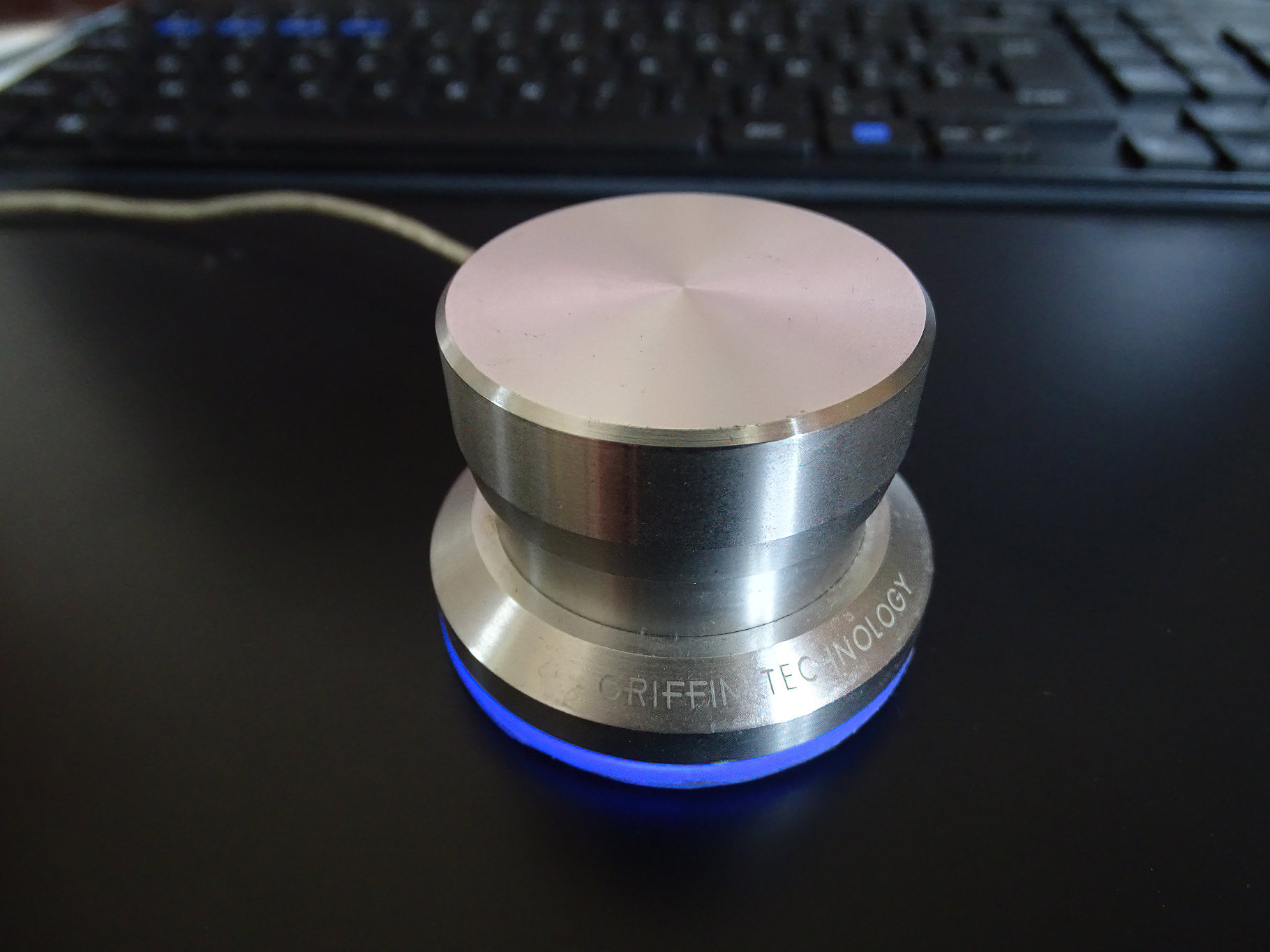
The PowerMate from Griffin Technology - review

The PowerMate from Griffin Technology is a very useful multimedia device that can be used to scrub video to and fro(fast forward-backward).  It’s a cheap solution that doesn’t really compare with professional video editing hardware, but it comes close to being a very affordable surrogate shuttle wheel.  It is actually what I have been looking [...]

How to make your video bigger without resizing

Let’s say you have a 320pixels x 240pixels movie and you want to upload it to a video channel? Then you need to adapt your video so that it will not stretch and look blurry. There is a rather simple trick for that: importing your video into a new one which is 480×360 [...]

How to reduce environmental sound in audios?

Environmental sounds are often confused with static because, just as static, it produces a disturbing drone in the background. Tthe funny thing is, that we hear those sounds in reality all the time, but we filter them from our minds automatically. If we wouldn’t block out all that irrelevant background noise, we would [...]

How to reduce static in my audio?

Some sound editors, like Audacity from SoundForge can reduce static noise, but the disadvantage is that it deforms the audio. Therefore, it is best to quelch static before it hits the sound card, so to speak.
The most common problem is the microphone (or headset) related to its surroundings.
If you are recording sound next to [...]

For video an extra hard drive is no luxury - part II

Since there is still an enormous evolution in external hard drives, information becomes stale while you write it, so here is an update on the subject that starts with a question from one of my pupils:
“I didn’t know hard drives can die on me so quickly”
Any piece of hardware can die on you any moment, [...]

« Previous Articles Next Articles »

Most read posts(from Sept)

Recent Comments:

Most commented posts